
Optimize your PC for all games.
Looking to play your favorite games at the highest FPS? Swiftrix is the only tool you need to optimize your PC and maximize performance. Never let stutters ruin your experience again.
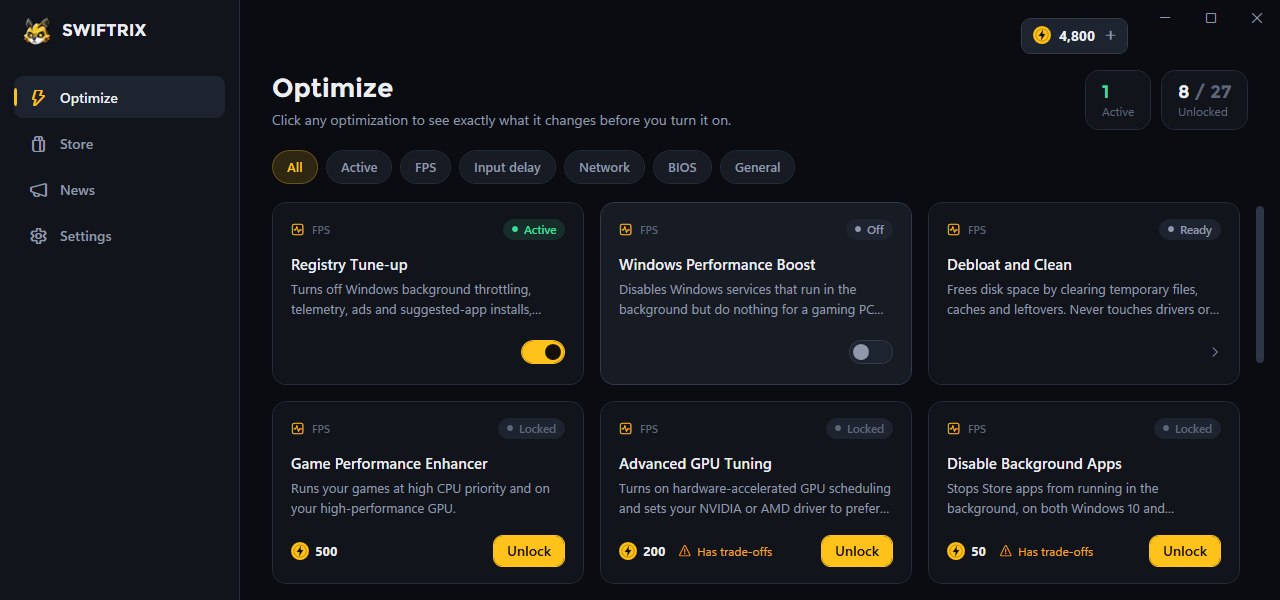
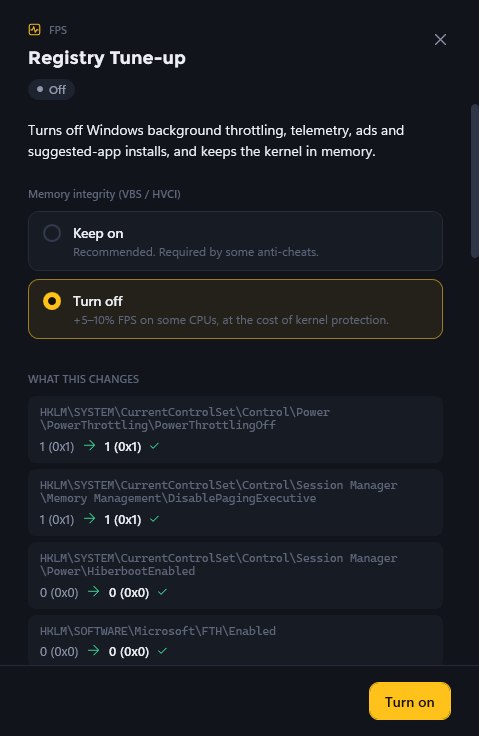
See exactly what changes before you turn it on.
Click any optimization to open its details. Swiftrix shows what it does and what it touches, so you decide with the full picture.
-
Every value, before and after
The registry keys an optimization sets are listed with their current and new values.
-
Trade-offs flagged up front
Optimizations with a cost are marked before you unlock them, not after.
-
Your call where it matters
Some optimizations ask first, like keeping memory integrity on for games whose anti-cheat needs it.
- FPS
- Input delay
- Network
- BIOS
- General
Set up in three steps.
-
Download
Grab the installer for Windows, or get Swiftrix from the Microsoft Store.
-
Run the installer
Run the installer and wait for it to finish.
-
Open Swiftrix
Open Swiftrix and sign up for a new account.
Never let stutters ruin your game again.
Try Swiftrix for free and see the difference on your own PC.